
Preview and download the warranty card format
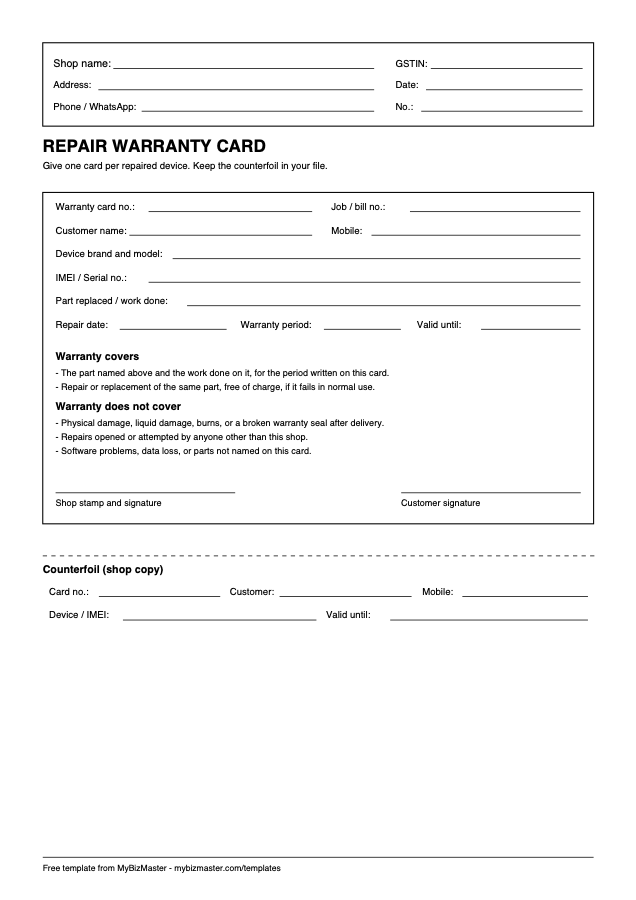
One A4 page: the customer’s card on top, the shop’s counterfoil below the dotted line.
What is on the card
- Card number, job or bill number and shop details
- Customer name and mobile
- Device brand and model, IMEI or serial
- Part replaced or work done, repair date, period and end date
- What is covered and what is not
- Shop and customer signatures, plus a counterfoil
What is a repair warranty card?
A repair warranty card is a written promise that the part you replaced and the work you did will be fixed free of charge if they fail in normal use within a stated period. It names the device and its IMEI or serial, so the warranty applies to that device only.
What should a warranty card include?
Include a card number, the job or bill number, the customer’s name and mobile, the device brand, model and IMEI or serial, the part replaced or work done, the repair date, the warranty period and end date, what is covered, what is not, and signatures from the shop and the customer.
How long should a repair warranty be?
That is your decision, but only promise what you can honour. A simple rule is to match the parts warranty to what your own supplier gives you, and keep labour to a period you are sure of. Write the exact number of days and the end date on the card.
How do I track warranty claims?
Keep the counterfoils filed by card number, and check the device and IMEI on any claim against your copy. In MyBizMaster, the warranty period prints on the job sheet, and a returning device opens a warranty case for labour, the part, or both, linked to the original job.
Read next: Repair shop management software · Service centre management software
Frequently asked questions
Is this warranty card format free?
Yes. Download the PDF, print it and use it in your shop. No sign-up is needed.
Does a warranty card replace the bill?
No. Give the bill as well. The card refers to the bill number, and the customer should keep both.
Can I change what the warranty covers?
Yes. The covered and not-covered lines are a starting point. Edit them to match the warranty you actually give before you print.
Last reviewed: