
Preview and download the repair bill format
Excel with working GST formulas, or a PDF to print and fill by hand.
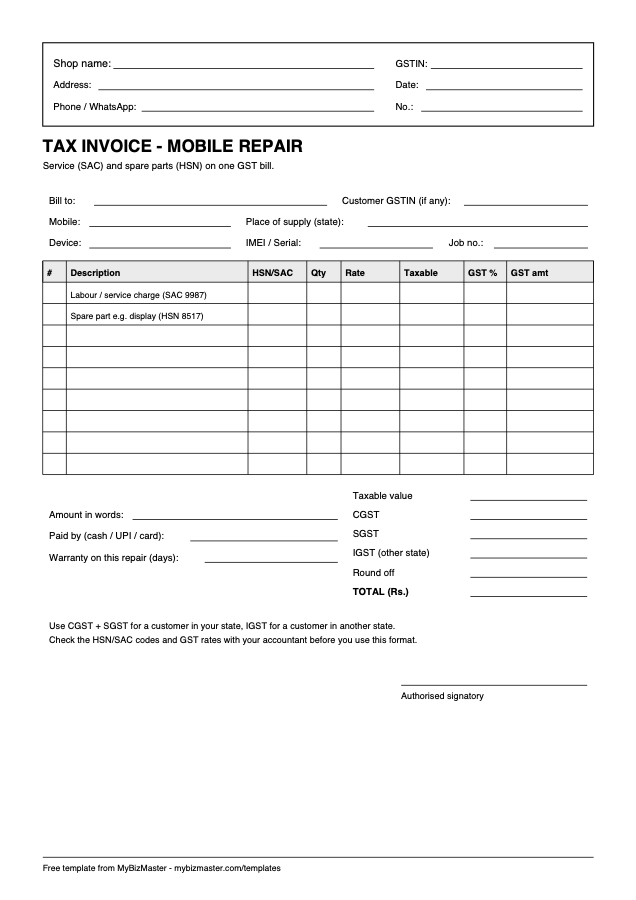
What is on the bill
- Shop name, address, GSTIN, invoice number and date
- Customer name, mobile, GSTIN and place of supply
- Device, IMEI or serial and job number
- Lines with HSN or SAC, quantity, rate, taxable value and GST
- CGST, SGST, IGST, round off and total
- Payment mode, warranty days and signature
What is a mobile repair bill format?
A mobile repair bill format is the invoice layout a repair shop uses to charge for a repair. A GST-registered shop needs it to be a tax invoice: labour charged as a service with a SAC code, spare parts as goods with HSN codes, and GST shown as CGST and SGST or IGST.
What must a GST repair bill include?
A GST tax invoice should show your name, address and GSTIN, a unique invoice number and date, the customer’s name and address, their GSTIN if registered, HSN or SAC codes, quantity, taxable value, tax rate and amount, place of supply, and a signature. Check special cases with your accountant.
Should I charge CGST and SGST or IGST on a repair?
Charge CGST and SGST, split equally, when the place of supply is in your own state, which is the usual case for a walk-in repair. Charge IGST when the place of supply is in another state. In the Excel template, set "Same state as shop?" to Y or N and the tax columns update.
How does the Excel repair bill work out GST?
Enter quantity, rate and GST percent on each line. The sheet multiplies quantity by rate for the taxable value, splits tax into CGST and SGST or puts it all in IGST, totals every column and rounds the grand total to the nearest rupee. The two sample lines show the layout; replace them.
GST rates and HSN codes change from time to time. The sample rates are examples only; confirm the current rate for each part and for repair service before you bill.
Can software create the repair bill automatically?
Yes. In MyBizMaster the labour and parts already on the job sheet become a GST repair invoice when the job closes, with CGST and SGST or IGST worked out from the place of supply. Parts were deducted from stock when used, so the bill and your inventory always agree.
Read next: Mobile repair shop software · Repair shop management software
Frequently asked questions
Is the repair bill format free?
Yes. Both the Excel and PDF versions are free to download and use. No sign-up is needed.
Can I use this bill if I am not GST registered?
A shop that is not registered under GST should not issue a tax invoice or charge GST. Use a bill of supply instead, without the GST columns.
Which SAC code is used for repair service?
The template shows SAC 9987, the heading for maintenance and repair services, as an example. Confirm the exact code and rate for your work with your accountant.
Last reviewed: