
Preview and download the job sheet format
One A4 page. Print two copies per device: one for the customer, one for the shop.
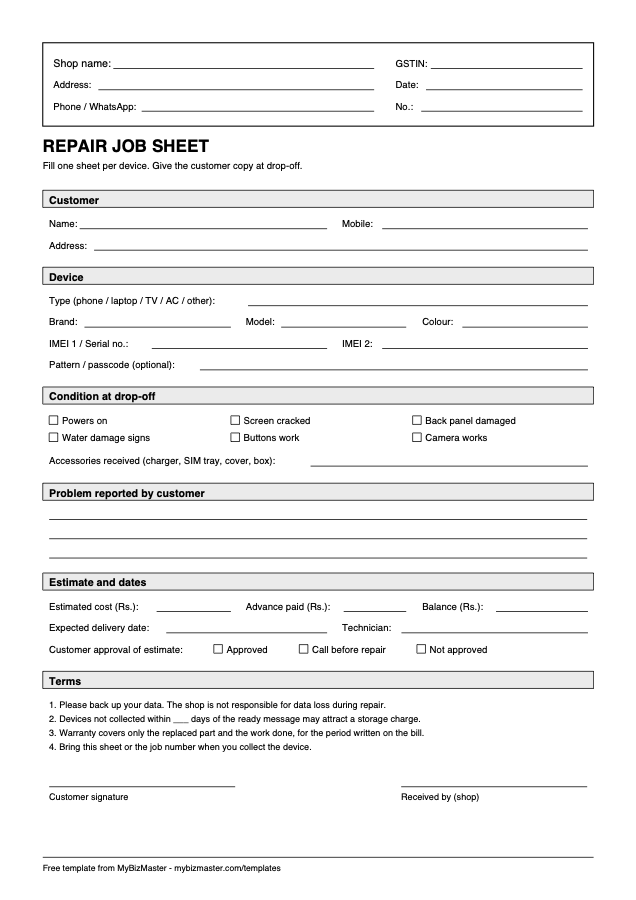
What is on the sheet
- Shop name, address, phone, GSTIN, date and job number
- Customer name, mobile and address
- Device type, brand, model, colour, IMEI 1, IMEI 2 or serial, pattern or passcode
- Condition checkboxes and accessories received
- Problem reported by the customer
- Estimated cost, advance, balance, delivery date, technician and approval
- Four standard terms and two signature lines
What is a repair job sheet format?
A repair job sheet format is a ready-made layout for the slip you fill when you accept a device for repair. It makes every staff member capture the same details, the customer, device, IMEI or serial, condition, fault, estimate and dates, so nothing is missed and the customer gets a clear receipt.
What should a repair job sheet include?
A repair job sheet should include the shop’s details, a job number and date, the customer’s name and mobile, the device type, brand, model and IMEI or serial, its condition and accessories, the reported problem, the estimate, advance and balance, the expected delivery date, terms, and both signatures.
How do I use this job sheet format?
Print two copies per device, or get the PDF printed as a carbon book. Fill the sheet with the customer at the counter, tick the condition boxes together, and have them sign. Give one copy to the customer and keep the other with the device until it is delivered.
Fill in the number of days in the storage-charge term before you print, and change any term that does not match how your shop works.
When should I move from a paper job sheet to software?
Move when you spend more time finding slips and answering "is it ready?" calls than repairing. Repair job sheet software keeps the same fields, but makes them searchable by phone or IMEI, sends WhatsApp updates and turns the job into a GST bill. MyBizMaster has a free plan for repair shops.
Read next: Repair job sheet software · Repair shop management software
Frequently asked questions
Is this job sheet format free to use?
Yes. Download it, print it and use it in your shop. No sign-up is needed.
Can I add my shop logo?
The PDF has blank lines for your shop name, address and GSTIN. To add a logo, stamp the printed copy or have the PDF printed as a book by a local printer with your logo.
Does it work for laptops and TVs as well as phones?
Yes. The device type line covers phones, laptops, TVs, ACs and other devices, and the IMEI line also takes a serial number.
Last reviewed: